
What is ClipsPal
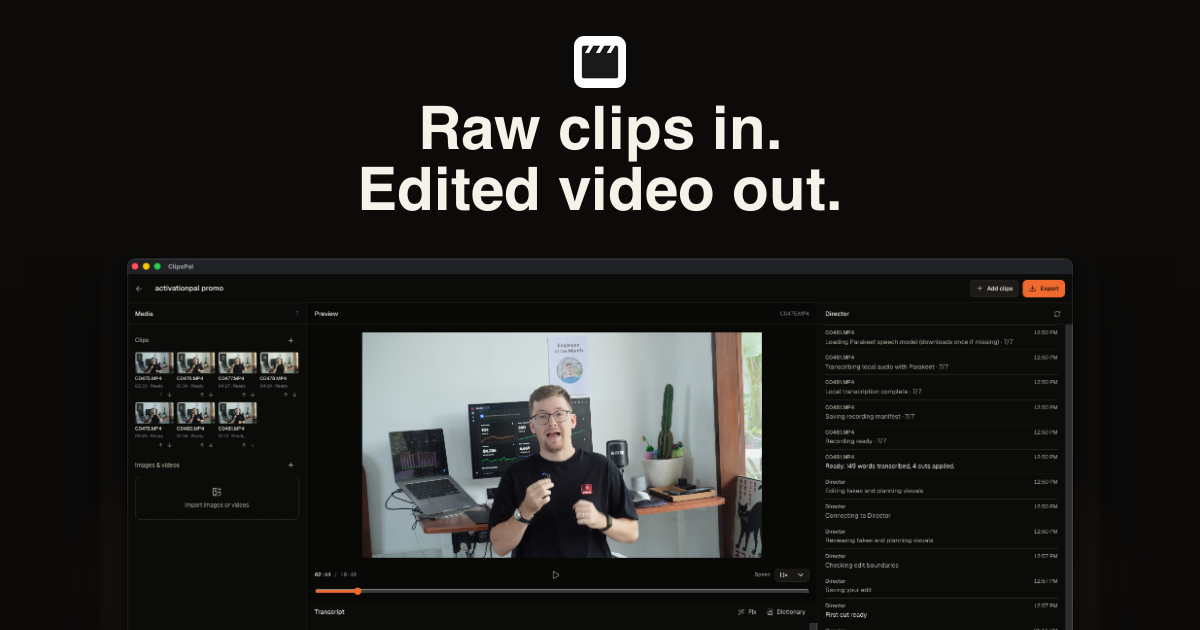
ClipsPal edits spoken recordings on Mac and Windows. Transcription runs locally. Review the cuts on the timeline, add subtitles and export the episode or clips for social media.
Key Features
- One-click auto edit: cuts failed takes and silences automatically
- Subtitles in 40 languages
- Zoom-ins, visuals, and sound effects added to the edit
- Animated motion slides designed by AI for selected words
- Repurpose video into shorts, articles, and YouTube chapters
- Built-in MCP server with 23 tools for AI agent control (Claude Code, Codex, Cursor, Windsurf, etc.)
- Local processing — footage and transcription stay on your computer; supports local AI model
Why we like it
- Runs on AI you already pay for — no per-video billing, just a one-time $59 license
- Full local processing option: footage, audio, and transcription never leave your Mac
- MCP server lets AI agents (Claude Code, Codex, Cursor) edit, create shorts, and export autonomously
Pros & Cons
Pros
- One-time lifetime license with no per-video charges — runs on AI plans you already own
- Video, audio, and transcription stay on your Mac, with a local model option for full privacy
- Produces multiple content formats (full video, shorts, article) from a single recording
- Reversible cuts with a real timeline, preview, and transcript — manual editing still possible
Cons
- No free editing trial — the app can be downloaded but editing requires purchasing a license
- AI provider costs (Claude Pro, ChatGPT plan, etc.) are separate from the ClipsPal license
- Windows version is a beta with lower transcription accuracy and missing Mac-only features (screen/camera recording, background removal)
Who is using ClipsPal
Video podcasters and producers editing recorded episodes.
- Founders and indie makers recording talking-head product updates or demos
- Course creators and educators turning lecture recordings into polished videos
- Content creators who want to repurpose one recording into a video, shorts, and a written article
- Developers and AI power-users who want to automate video editing via MCP agents
- Solo creators who want to reduce editing time without a subscription-based cloud service
ClipsPal Pricing
One-time
One-time lifetime license at $59 (price rises by $10 every 20 licenses sold, up to $199); covers 2 computers; includes lifetime access to the purchased version and one year of updates; no subscription, no per-video fees.
Pricing details may change. Check the official website for the latest information.
What makes ClipsPal unique
Unlike cloud-based AI video editors that charge per video or per minute, ClipsPal runs entirely on the AI subscription the user already has (Claude Pro, ChatGPT, Gemini, Grok, or a free local model), with a single one-time license fee. Its built-in MCP server with 23 tools is a notable differentiator, allowing AI coding agents like Claude Code, Codex, and Cursor to directly control the editor — cutting, creating shorts, generating chapters, and exporting — without any manual UI interaction. Footage and transcription remain local, making it one of the few AI video editors with a fully offline/local-model option.
ClipsPal Alternatives
Descript, Opus Clip, Riverside.fm, Palmier Pro, VideoEdit MCP
Reviews & Ratings
★★★★★ 0.0 • (0)Share Your Experience
No Reviews Yet
Be the first to share your experience with this tool