What is Descript Rooms
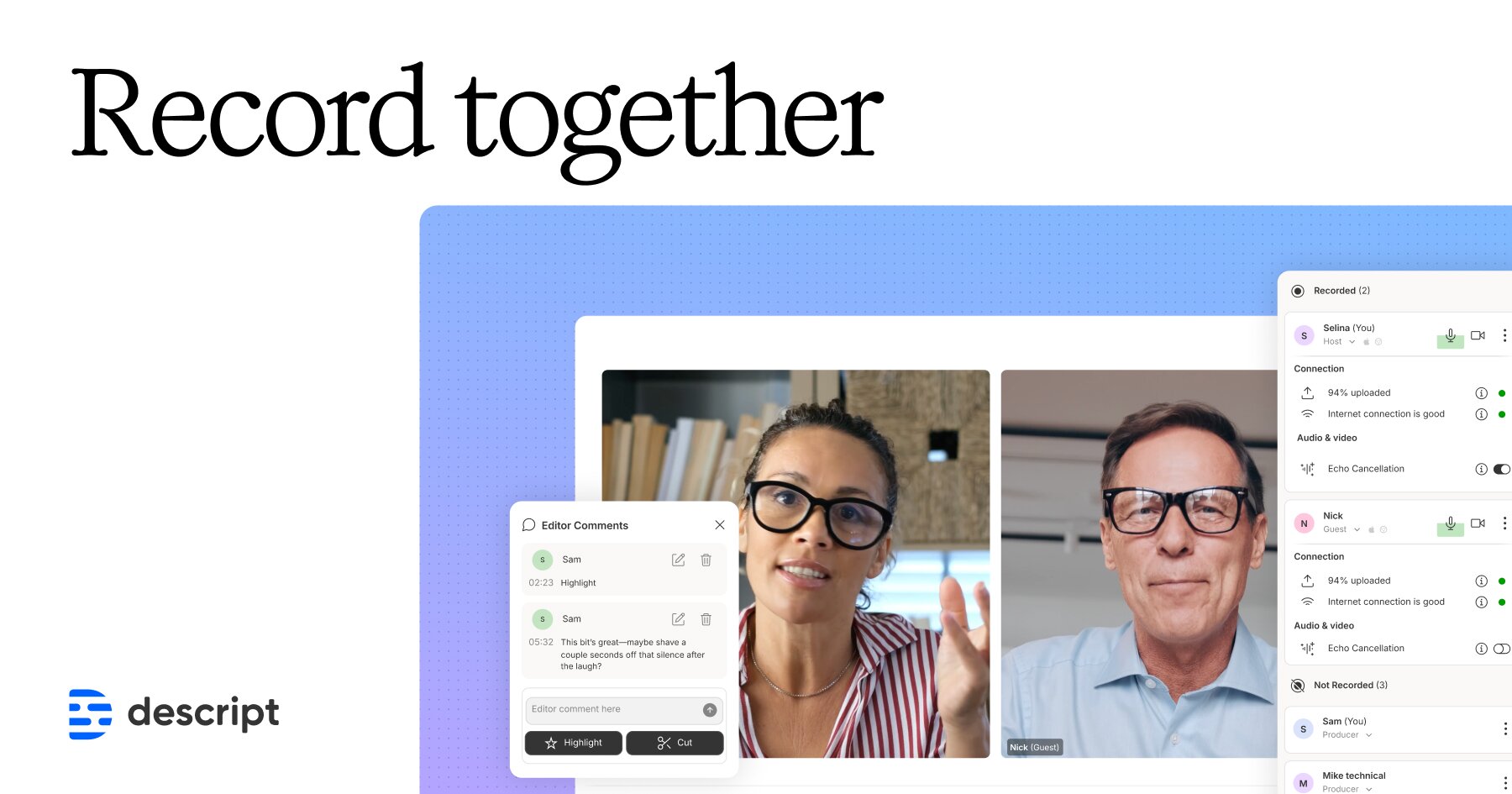
Descript Rooms is an integrated, collaborative recording studio built into the Descript platform. It combines video conferencing and multi-participant recording in one browser-based experience, capturing each participant’s audio and video locally at up to 4K resolution — even if internet connections are unstable — while progressively uploading files to the cloud as a backup. Sessions support up to 10 participants and automatically populate a Descript project with individual multitrack files the moment recording stops, eliminating the need to download, transfer, or re-import media.
The platform includes a role-based permission system (Host, Co-host, Producer, Guest, Viewer) and a Control Room feature — available on Business and Enterprise plans — that lets producers monitor and direct sessions off-screen without being recorded. AI tools built into the broader Descript workflow, such as Studio Sound noise removal, filler-word removal, AI Eye Contact correction, AI Green Screen, and Automatic Multicam editing, are all accessible immediately after a Rooms session ends.
Reviewers note that Descript Rooms has matured significantly since its early beta, with echo cancellation, improved video quality, and tighter editor integration making it a credible alternative to dedicated remote recording tools like Riverside.fm. Some reviewers still flag occasional bugs and note that the Automatic Multicam AI feature does not always produce results that match professional expectations without custom templates.
Key Features
- Local 4K multitrack recording for up to 10 participants with progressive cloud backup
- Browser-based — no app download required for guests
- Control Room with Producer and Co-host roles (Business/Enterprise plans) for off-screen session management
- Automatic project creation: recordings import directly into Descript editor as separate tracks
- AI Studio Sound for noise removal and voice enhancement post-recording
- Automatic Multicam AI editing using branded layout templates (requires Rooms footage)
- Screen sharing (up to two simultaneous sharers, with audio) and audio-only recording mode
Why we like it
- Record-to-edit in one click: multitrack files land directly in a Descript project with no file transfer
- Local capture + progressive cloud backup protects recordings even if a participant's computer crashes
- Control Room lets off-screen producers direct live sessions — a broadcast-level feature for remote podcasting
Pros & Cons
Pros
- Seamless record-to-edit workflow — no file transfer needed; project is ready as soon as recording stops
- Local capture means recording quality is unaffected by internet glitches
- Recent updates have significantly improved reliability and echo cancellation compared to earlier versions
- All-in-one value: replaces separate tools like Riverside or SquadCast for teams already using Descript
Cons
- Automatic Multicam AI feature does not always produce professional-looking results without custom templates
- Software can still be buggy in some situations according to reviewers
- No built-in session scheduling; hosts must share Room links manually via calendar invites
- Mobile support is not yet available (in development)
Who is using Descript Rooms
Podcast hosts, video creators, and content teams who want a single platform to record remote sessions in high quality and move immediately into AI-assisted editing without switching tools.
- Podcast hosts recording remote interviews or co-hosted shows with guests
- Video podcasters and YouTubers needing 4K multitrack footage for post-production
- Content teams with producers who need to direct sessions without appearing on camera
- Educators and marketers recording remote conversations for repurposing into clips or courses
- Creators already using Descript for editing who want an end-to-end record-and-edit workflow
Descript Rooms Pricing
Freemium
Rooms access is included with all Descript plans. Free ($0/mo): 60 media minutes/month, watermarked exports, limited AI. Hobbyist ($16/user/mo annually, $24/user/mo monthly). Creator ($24/user/mo annually, $35/user/mo monthly). Business ($50/user/mo annually). Enterprise: contact sales. Control Room (Producer/Co-host roles) requires Business or Enterprise plan.
Pricing details may change. Check the official website for the latest information.
What makes Descript Rooms unique
Unlike standalone remote recording tools such as Riverside.fm or SquadCast, Descript Rooms is natively embedded inside the Descript editor, meaning recorded multitrack files are automatically transcribed and arranged in a project sequence the moment a session ends — with no file export, download, or re-import step. The addition of Control Room (Producer and Co-host roles) brings broadcast-style session management to remote podcast recording, a feature not commonly found in competing tools at this price point. Descript is also the only editing platform with a native Zoom multitrack import integration, giving it flexibility for teams that prefer to record in Zoom but edit in Descript.
Descript Rooms Alternatives
Riverside.fm, SquadCast, Zencastr, Cleanfeed, Zoom (with Descript import)
Reviews & Ratings
★★★★★ 0.0 • (0)Share Your Experience
No Reviews Yet
Be the first to share your experience with this tool