What is GarageBand
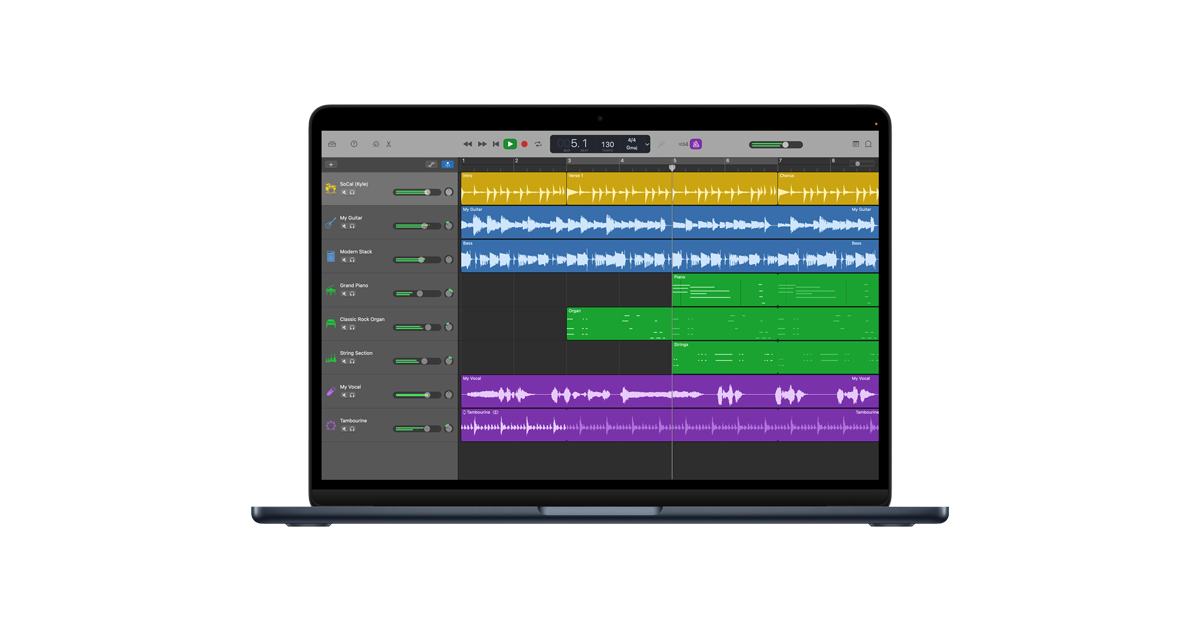
GarageBand is Apple’s free digital audio workstation (DAW), available on macOS, iPadOS, and iOS, that doubles as a fully capable podcast recording and editing studio. Originally launched in 2004, it provides an intuitive multitrack interface where podcasters can record vocals, layer background music, add sound effects, and fine-tune their audio — all without spending a penny. Its drag-and-drop workflow, built-in Apple Loops library, and suite of audio effects make it easy for beginners to produce polished episodes right out of the box.
For podcasters, GarageBand’s most useful features include multitrack recording (so each speaker or sound layer sits on its own track), track automation for dynamic volume control, split-region editing to remove mistakes or filler words, and a library of royalty-free Apple Loops for creating custom intros, outros, and bumper music. It also supports third-party microphones and audio interfaces, MIDI instruments, and plug-in effects like reverb, compression, and EQ — giving producers meaningful control over their sound quality.
While GarageBand is primarily a music creation tool and lacks some podcast-specific niceties (no built-in hosting, no dedicated fade tool, no direct RSS feed publishing), it remains one of the most popular free options for Apple-ecosystem podcasters. After editing, episodes can be exported as WAV or MP3 files and uploaded to any podcast hosting platform. For creators who eventually need more power, it serves as a natural gateway to Apple’s professional-grade Logic Pro.
Key Features
- Multitrack audio recording with support for external mics and audio interfaces
- Non-destructive track editing: trim, split, and rearrange audio regions
- Track automation for dynamic volume, pan, and effects control
- Built-in Apple Loops library for royalty-free intro/outro/bumper music
- Built-in audio effects including EQ, compression, reverb, and pitch correction
- Export to MP3 or WAV for upload to any podcast hosting platform
- Available on Mac, iPhone, and iPad for cross-device editing
Why we like it
- Completely free with every Apple device — zero upfront or ongoing cost
- Multitrack editing, automation, and built-in effects rival many paid DAWs
- Built-in Apple Loops let you create original podcast music without leaving the app
Pros & Cons
Pros
- Completely free on all Apple devices — no subscription or one-time fee
- Intuitive, polished interface with a very shallow learning curve for beginners
- Full-featured multitrack editing capable of producing professional-sounding episodes
- Cross-device workflow: start on iPhone, finish on Mac
Cons
- Exclusive to Apple ecosystem — unavailable on Windows or Android
- Not built specifically for podcasting; music-centric features must be ignored or worked around
- No built-in podcast hosting, distribution, or direct RSS publishing
Who is using GarageBand
Ideal for beginner-to-intermediate podcasters who own a Mac, iPhone, or iPad and want a free, polished, and capable tool for recording and editing their show without any financial commitment.
- Beginner podcasters on Mac wanting a free, easy-to-learn recording and editing tool
- Solo podcasters recording voice-only or interview episodes on a tight budget
- Creators who want to produce custom intro/outro music alongside their podcast audio
- Educators and students using Apple devices to create class or school podcasts
- Experienced podcasters already in the Apple ecosystem who want a zero-cost DAW before upgrading to Logic Pro
GarageBand Pricing
Free
Free — available at no cost from the Mac App Store and iOS App Store for all Apple device owners.
Pricing details may change. Check the official website for the latest information.
What makes GarageBand unique
GarageBand's standout advantage is that it comes free with every Apple device and requires no setup cost whatsoever, yet delivers a surprisingly deep feature set — multitrack recording, automation, a full effects rack, and a rich Apple Loops library — that rivals paid entry-level DAWs. Unlike purpose-built podcast editors such as Descript or Alitu, GarageBand also doubles as a music production studio, meaning podcasters can create their own original theme music, bumpers, and sound design entirely within one app. Its seamless integration across Mac, iPhone, and iPad, combined with Apple's signature ease-of-use philosophy, makes it uniquely accessible for creators who may eventually scale up to Logic Pro without ever changing their core workflow.
GarageBand Alternatives
Audacity, Adobe Audition, Logic Pro, Descript, Hindenburg Journalist
Reviews & Ratings
★★★★★ 0.0 • (0)Share Your Experience
No Reviews Yet
Be the first to share your experience with this tool