What is Recast Studio
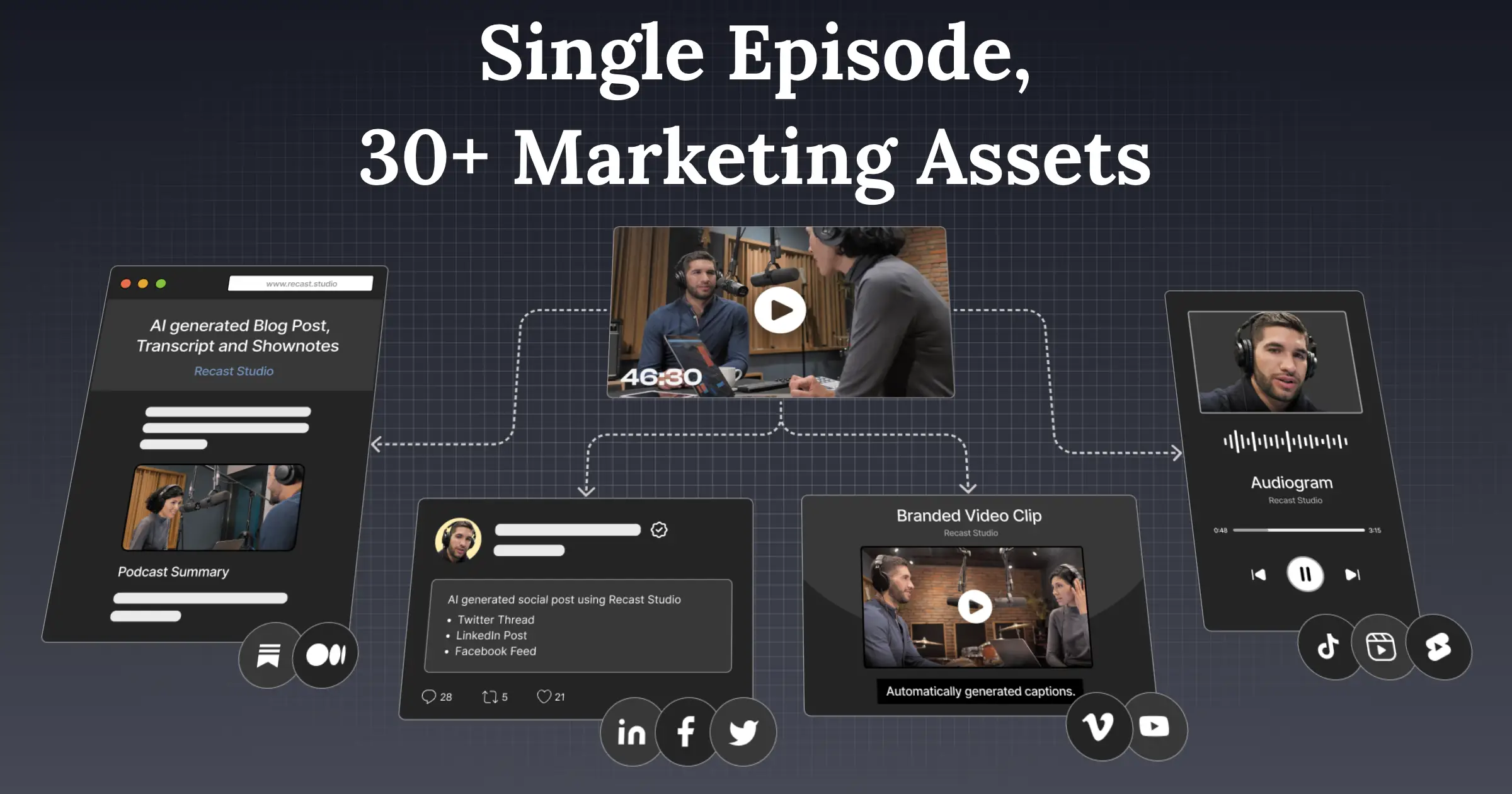
Recast Studio is an AI-powered content repurposing platform designed for marketing teams and podcasters who want to transform long-form audio and video recordings into a full suite of marketing assets without needing video editing skills. Upload a podcast episode, webinar, or Zoom recording and the platform automatically extracts highlight clips, generates audiograms, produces transcripts, writes show notes, drafts blog posts, and creates social media captions — all from a single file.
The platform features a transcript-based editor that lets users cut video by editing text, AI-powered auto-framing and filler-word removal, branded template customization, and direct scheduling to TikTok, Instagram, YouTube, Facebook, LinkedIn, and Twitter without switching tools. It also supports team collaboration with shared workspaces, comments, and multi-user access.
Reviewers consistently praise its ease of use and time savings, with users noting it replaces the need for a dedicated video editor or content repurposing contractor. Critics have noted that AI-generated written content sometimes requires manual refinement, that the platform has undergone multiple pivots affecting feature consistency, and that transcription accuracy can vary depending on audio quality.
Key Features
- AI clip extraction — automatically identifies and cuts the most engaging highlights from long-form audio/video
- Audiogram generator — converts podcast audio into animated video clips with waveform visualization and captions
- AI-generated show notes, blog posts, social media posts, and email summaries from a single recording
- Transcript-based video editing — edit video by highlighting or deleting text in the auto-generated transcript
- Direct social media publishing and scheduling to TikTok, Instagram, YouTube, Facebook, LinkedIn, and Twitter
- Auto-framing and filler-word removal (removes 'um', 'uh', and silences automatically)
- Branded templates with custom fonts, logos, colors, and support for emojis, GIFs, and progress bars
Why we like it
- All-in-one repurposing: clips, audiograms, show notes, blog posts, and social scheduling from one upload — no tool-switching required
- Transcript-based editing makes video cutting accessible to non-editors, praised by reviewers as faster and less intimidating than timeline editing
- Direct publish and schedule to 6+ social platforms from within the editor, eliminating the download-reupload workflow
Pros & Cons
Pros
- Highly intuitive and beginner-friendly — reviewers on Trustpilot repeatedly describe it as easy to use with no video editing experience required
- Significant time savings — users report replacing hours of manual repurposing work, with one reviewer noting it replaced a $1,200/month contractor
- Strong AI clip finder — one reviewer found 17 clips in an hour-long video, calling it one of the more powerful clip finders on the market
- Accurate transcription that saves editing time, with Trustpilot reviewers calling it 'the best audiogram creator' they've encountered
Cons
- AI-generated written content (show notes, blog posts, social posts) often requires manual editing to match brand voice and SEO standards
- Platform has undergone multiple pivots, with at least one Capterra reviewer noting feature inconsistency and loss of previously available functions
- Transcription accuracy can vary depending on audio/video quality, and some users report upload times can be slow for long files
Who is using Recast Studio
Podcasters, marketing teams, and solo content creators who regularly produce long-form audio or video content and need to repurpose it into social-ready clips and written assets quickly, without video editing expertise.
- Podcasters repurposing episodes into short video clips for TikTok, Instagram Reels, and YouTube Shorts
- Marketing teams creating social assets from webinars and live events without a dedicated video editor
- Solo content creators maintaining a consistent multi-platform presence from a single recording
- Webinar hosts and educators breaking down long sessions into digestible clips and written summaries
- Podcast producers generating SEO-optimized show notes, blog posts, and email newsletters automatically
Recast Studio Pricing
Freemium
Free plan available (1 upload free trial, no credit card required); paid plans start at approximately $14/month billed annually (Starter), with higher tiers offering more storage, longer clip durations, and team collaboration features. An older Trustpilot review referenced a $10/month entry tier, suggesting pricing has evolved.
Pricing details may change. Check the official website for the latest information.
What makes Recast Studio unique
Recast Studio differentiates itself from alternatives like OpusClip (focused solely on viral short-clip generation), Descript (focused on text-based audio/video editing), and Podsqueeze (text-content generation only) by combining all three workflows — video clip creation, audiogram production, and written content generation — into a single platform with built-in social scheduling. Reviewers specifically highlight that its 'one-to-many' approach can generate over 30 marketing assets from a single episode upload, and that its AI clip finder is among the strongest available, finding more clips per episode than competing tools in head-to-head comparisons.
Recast Studio Alternatives
OpusClip, Descript, Podsqueeze, Riverside.fm, Headliner
Reviews & Ratings
★★★★★ 0.0 • (0)Share Your Experience
No Reviews Yet
Be the first to share your experience with this tool